
eSIM Compatibility
Check if your device is compatible with eSIM technology
1. Is my phone compatible with eSIM?
To use an eSIM, your device must support this technology.
Most recent iPhone, Samsung and Google Pixel models support eSIM. Compatibility can vary by model, country of purchase and carrier.
Before purchasing, check your phone settings or the manufacturer’s official specifications. Your phone must also be carrier-unlocked.
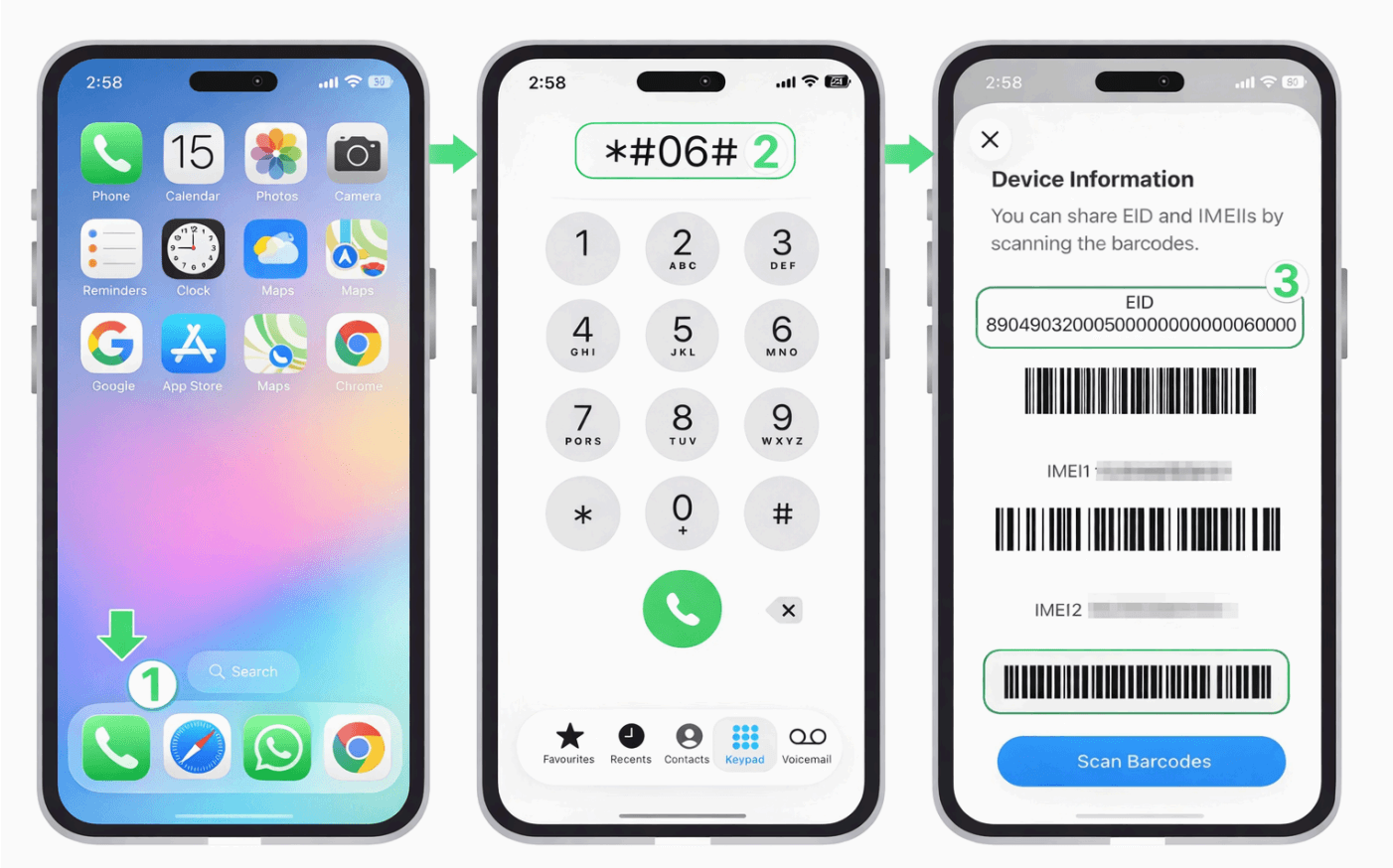
How to check your phone
Dial this code in your phone app:
*#06#If an EID number appears, the device supports eSIM. If no EID appears, eSIM may be unavailable or disabled on that model.
2. How do I know if my laptop supports eSIM?
A compatible laptop needs integrated mobile connectivity and eSIM support. This is normally available only on selected LTE or 5G models.
Check the manufacturer’s technical specifications, your operating system’s cellular network settings, or the model’s official support documentation.
3. Does my phone need to be unlocked?
Yes. Your phone must be carrier-unlocked to install and use a OneClickSim data plan. Ask your current carrier if you are not sure whether the device is locked.
4. Does eSIM work on iPad or other tablets?
Yes, if the tablet supports eSIM and cellular connectivity. On iPad, only Wi-Fi + Cellular models can use eSIM. Check the exact model specifications before purchasing.
5. Can I use an eSIM and a physical SIM together?
Yes, on most Dual SIM devices. You can keep your physical SIM for calls and SMS and use your OneClickSim eSIM for mobile data while travelling.
6. Can I keep my usual number active?
Yes. On a Dual SIM phone, keep your regular line active for calls or SMS and select the eSIM as the mobile-data line.
7. Can I install more than one eSIM?
Many devices can store several eSIM profiles, although the number that can be active at the same time depends on the model. Check your manufacturer’s specifications.